
Map Coloring with 2 Colors – 2
Map makers color maps so regions sharing a border have different colors. Maps that have an even number of lines going out from each interior intersection point can always be colored using 2 colors. Here is an example.
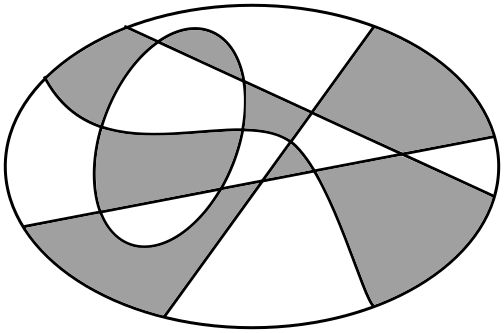
THE CHALLENGE
This more complicated map has an even number of lines going out from each interior intersection point. Color it using just two colors.
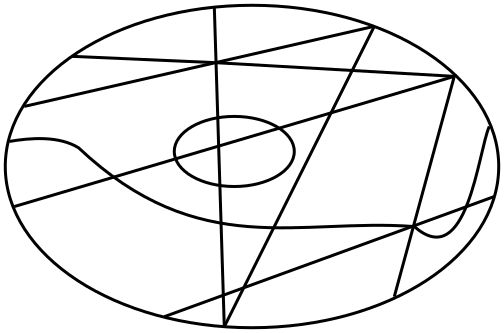
EXPLORATION
Create a simple map with an interior intersection point that has an odd number of lines going out from it. Why is it impossible to color your map with just 2 colors?
Notes
THE CHALLENGE
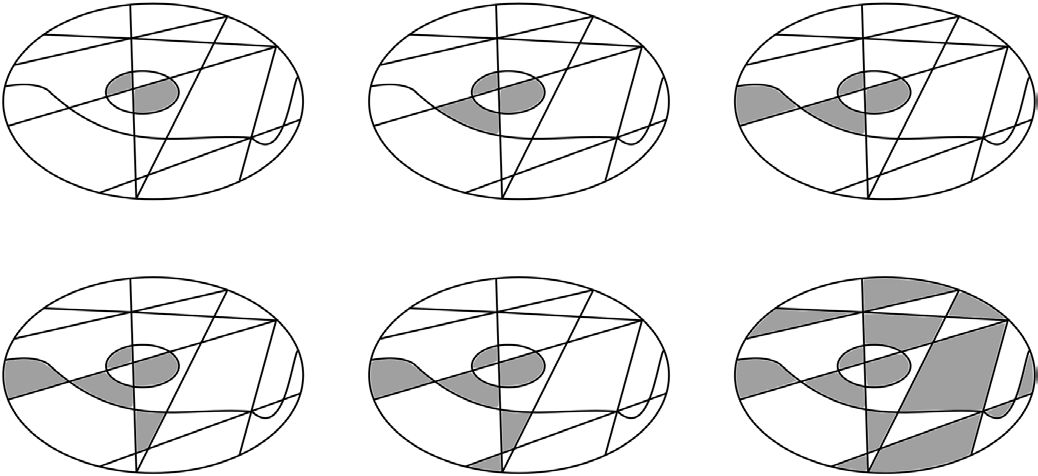
This is easier than it sounds. The only trick is to not jump around in the map.
Start at any intersection point. For all the regions that have that point as a corner, color the regions with alternating colors as you work your way around the point in one direction.
Once you have finished with a point, move to any other point that has at least one region already colored. Starting with the region that was already colored, work your way around this new point alternating colors as you go.
Because there is an even number of regions that have a common corner, you will always be able to alternate the colors when working your way around an intersection point.
It’s as simple as that!
EXPLORATION
If you have an odd number of regions surrounding a point and you try to use alternating colors, you will get stuck as you work your way around the point. At the end, you will have to use a new color for the last region!